Context Menus
Three menus (row number, header, cell), each taking the built-in items, a subset of them, or items of your own.
Methods documented here: setOptions().
Context Menus (rowContextMenuItems / colContextMenuItems / cellContextMenuItems / setOptions)
Right-clicking opens one of three menus, depending on where the pointer is. On a touch screen a half-second press does the same, and on the keyboard ContextMenu or Shift+F10 opens the menu of a focused column header or row number.
| Right-click on | Items | Narrowed by |
|---|---|---|
| A row number | Pin row to top / to bottom, Unpin row; Insert row above / below / at top / at bottom; Hide row and Show all hidden rows; Mark row for deletion and Delete row permanently (for a row from the server), Delete row (for a row you added), Undo delete | rowContextMenuItems |
| A column header | Freeze columns to the left / Unfreeze, Freeze columns to the right / Unfreeze, Column visibility…, Insert column left / right, Delete column / Undo delete | colContextMenuItems |
| A cell | Insert column left / right, Delete column, Insert row below, Delete row, followed by your own items | cellContextMenuItems and cellContextMenuExtraItems |
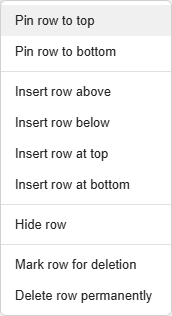
Each option is false to switch that menu off (a right-click then does nothing), or a list of the keys to keep, or left out to show everything. An unknown key is ignored with a console warning that lists the valid ones. 'row-delete' stands for every delete-related item of the row menu and 'row-pin' for every pin item, since which of them shows depends on the row. Rows you supplied through pinnedTopRows / pinnedBottomRows / setPinnedRows() get no row menu.
const grid = new JHGrid({
  container: '#grid',
  data: rows,
  editableCols: '*',
  rowContextMenuItems:  ['row-insert-above', 'row-insert-below', 'row-delete'],  // no pin, no top/bottom insert
  colContextMenuItems:  ['freeze', 'freeze-right', 'visibility'],                // no insert or delete column
  cellContextMenuItems: ['row-delete'],
});
Adding your own cell menu items. cellContextMenuExtraItems is called each time the cell menu opens and returns { label, onClick, disabled? } items (or null) to add after the built-in ones. It is the way to attach an action to a cell. onClick gets the same context, so it can use the row’s data or the pointer position:
new JHGrid({
  container: '#grid',
  data: users,
  cellContextMenuItems: ['row-delete'],
  cellContextMenuExtraItems: ({ row, field, rowData }) => [
    { label: `Copy ${field}`,
      onClick: () => navigator.clipboard.writeText(String(rowData?.[field] ?? '')) },
    { label: 'Open user',
      disabled: !rowData?.id,
      onClick: ({ rowData }) => { location.href = `/users/${rowData.id}`; } },
  ],
});
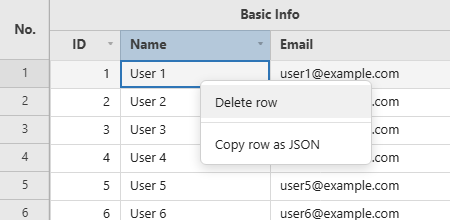
The context is { row, col, field, rowData, clientX, clientY }; clientX / clientY are viewport coordinates, so you can anchor your own popup at the cell. rowData is null for a row that has not loaded.
Changing them later. setOptions(patch) changes these options on a live grid. The options it accepts are the three menu filters, cellContextMenuExtraItems, rowPinButton, onRowPinToggle and editableCols; anything else is read once when the grid is built, so it is ignored with a console warning (the other keys of the same call still apply) and needs a new grid. Passing undefined for a menu option puts it back to showing everything. Menus that are open close, and a patch that is not an object throws a TypeError.
// Switch the editing menus off while a record is locked, and back on afterwards.
function setLocked(locked) {
  grid.setOptions({
    rowContextMenuItems:  locked ? false : undefined,
    cellContextMenuItems: locked ? false : undefined,
    colContextMenuItems:  locked ? ['freeze', 'freeze-right', 'visibility'] : undefined,
  });
}

grid.setOptions({ rowPinButton: 'bottom' });   // pin icons now pin to the bottom band
View mode / edit mode without rebuilding the grid. editableCols takes the same values here as in the constructor (string[] or '*') and is applied immediately - no destroy()/recreate, so scroll position, selection and undo history all survive the switch:
const grid = new JHGrid({ container: '#grid', data: rows, editableCols: [] }); // starts read-only

viewModeToggle.addEventListener('change', (e) => {
  grid.setOptions({ editableCols: e.target.checked ? '*' : [] });
});
A columnDef.editable override still wins either way - it forces a column editable or read-only regardless of what editableCols says, live or at construction.