Methods
Every public method, alphabetically, with the page that documents it. The calls that belong to no single feature are written up here.
Methods documented here: canRedo(), canUndo(), clearEdits(), destroy(), getCellValue(), getCurrentPage(), getEdits(), getInvalidCells(), getPageCount(), getPageSize(), getRowData(), getTotalRows(), goToPage(), isValid(), nextPage(), prevPage(), ready(), redo(), refresh(), reloadData(), repaint(), scrollTo(), setCellValue(), setCellValues(), setPageSize(), undo(), validateAll().
Public Methods
Every public method, and where it is documented. Methods whose behaviour is a feature in its own right are written up under Features rather than repeated here.
refresh()
Starts over: reloads the data from the first row and throws away everything the grid was holding on to. That includes unsaved edits, filters, sorts, the quick filter, selection, undo history, row heights, column widths and order, columns added or deleted with addColumn()/deleteColumn(), and rows added or removed with addRow()/deleteRow(). Use it for “reload this screen from scratch”; to pick up changed data while keeping the user’s view, use reloadData() instead. It does not ask for confirmation, so check getEdits() first if there may be unsaved work.
grid.refresh();
reloadData()
Re-runs fetchMeta/fetchData against the current filter and sort, for when the host changed the data behind the grid (a row removed, rows appended, a server push) and wants the grid to follow without starting over. Unlike refresh(), filters, sort and column state (order, widths, hidden columns) survive, and the scroll position is kept by default. Selection, unsaved edits and the undo history are cleared, the same as when a filter or sort changes, because a reload can shift row indices. Returns a Promise that resolves once the new rows are in.
Unlike a filter or sort change, reloadData() does not ask for confirmation before it drops unsaved edits, so save or collect them first. Rows added with addRow() and everything on pinned rows survive it, and it works the same for a data array (which it re-reads).
await fetch('/api/rows/42', { method: 'DELETE' });
await grid.reloadData();                        // stays where it was, filters and sort intact

await grid.reloadData({ keepScroll: false });   // also jumps back to the top
repaint()
Schedules a redraw without touching data, scroll position, edits, filters, or sort, for when something a cellBackground/rowHighlighter/cellDecorator callback reads changed outside the grid (some other host state) and the next frame needs to reflect it. Much cheaper than refresh() when the underlying data hasn’t actually changed.
someExternalFlag = true;
grid.repaint(); // cellBackground etc. re-evaluate on the next frame
scrollTo(rowIndex)
Scrolls to the specified row. If pagination is enabled, first switches to the page that row belongs to.
grid.scrollTo(5000);
goToPage(page) / nextPage() / prevPage()
Only works when the pagination option is enabled. goToPage() clamps the value to a valid page range.
grid.goToPage(2);
grid.nextPage();
grid.prevPage();
getCurrentPage() / getPageCount()
Returns the current 0-based page number and the total page count. Returns 0 and 1, respectively, when pagination is disabled.
setPageSize(n) / getPageSize()
Changes the rows per page while the grid is running, and reads it back. Only works when the pagination option is enabled (setPageSize() is otherwise a no-op and getPageSize() returns 0). The first row of the page being viewed stays on screen, so the page number is recomputed for the new size; selection is cleared, as on any page change. A size that is not in pageSizeOptions is added to the dropdown. Throws a TypeError unless n is a whole number of at least 1. See Pagination.
grid.setPageSize(100);
grid.getPageSize(); // 100
getEdits()
Returns the cell values that were edited and not yet saved, as { rowIndex: { field: value } }. Use this when saving/sending to the server.
- Every value is a string, whatever the column holds: a number typed into a cell is
'25', a cleared cell is'', a checkbox is'true'/'false'. rowIndexis the row’s current position in the grid (a row inserted above it moves it down), and it counts edits on rows added withaddRow()and on pinned rows too. To tell a new row from a server row useisNewRow(), and to get the whole row with the edits applied usegetRowData().- With pagination on, indices are still absolute across the whole dataset.
- Sorting, filtering,
refresh()andreloadData()re-arrange rows, so they clear the edits (after asking, if a server row has one); read them first.
const edits = grid.getEdits();
// { 42: { name: 'New Name' }, 100: { age: '25' } }
await fetch('/api/save', { method: 'POST', body: JSON.stringify(edits) });
To send each changed row with its key instead of its position:
const changes = Object.entries(grid.getEdits()).map(([row, fields]) => ({
  id:     grid.getOriginalRowData(Number(row))?.id,   // the row's key before any edit
  fields,                                             // { name: 'New Name' }
}));
await fetch('/api/save', {
  method: 'POST',
  headers: { 'Content-Type': 'application/json' },
  body: JSON.stringify(changes),
});
grid.clearEdits();
clearEdits()
Clears all edits (restores the original data) and empties the undo history. Call it after a successful save when you are not reloading the data. Rows added with addRow() and delete marks are not touched.
grid.clearEdits();
setCellValue(row, field, value)
Programmatically sets a cell value, going through the same edit/validation/undo/onCellChange path as a normal edit (checkbox toggle, paste, fill). Useful when one column’s value needs to be updated from another column (e.g. a button column toggling a checkbox column’s value). Throws if row is not an existing row (an index within the grid, or an encoded pinned-row index), if field/value is not a string, or if field is not an existing column.
grid.setCellValue(3, 'active', 'false'); // sets row 3's 'active' column to 'false'
setCellValues(entries)
Bulk counterpart to setCellValue(), applies every entry through the same edit/validation/undo pipeline as a single edit/undo step and one redraw, instead of one redraw per cell. Use this for large-scale updates (e.g. a header checkbox toggling every currently-filtered row) where looping setCellValue() would redraw once per row. Throws under the same conditions as setCellValue().
grid.setCellValues([
  { row: 0, field: 'active', value: 'true' },
  { row: 1, field: 'active', value: 'true' },
  { row: 2, field: 'active', value: 'true' },
]);
Performance note: even batched, this still runs the full edit/validation pipeline once per entry. Applying it to a very large number of rows at once (hundreds of thousands or more) can take a long time and block the main thread while it runs; see the performance note under
Deletefor a concrete measurement of the same underlying cost at that scale.
undo() / redo()
Undoes or redoes the most recent action (cell edit, paste/fill/clear, row/column add/delete, column hide/show/resize/reorder/auto-fit, row-height drag-resize, pin/unpin, setState()). The history keeps the last 100 actions, and one paste, fill or clear counts as a single step. Also works via Ctrl+Z (undo) / Ctrl+Y or Ctrl+Shift+Z (redo). Use canUndo() / canRedo() to check availability. Applying a sort/filter (setFilter/setSort/clearFilters, etc.) or calling refresh() re-arranges row indices, so the undo/redo history is automatically cleared.
The keys can be switched off individually with the keyboardShortcuts option:
new JHGrid({
  // ...
  keyboardShortcuts: { delete: false, undo: false }, // omitted keys stay on
});
Supported keys are delete (Delete/Backspace clearing the selected cells), cut (Ctrl+X copying the selection and then clearing it), undo (Ctrl+Z) and redo (Ctrl+Y / Ctrl+Shift+Z). Only the keyboard is affected: undo()/redo() keep working when called from code, and clearing cells through the context menu or the API is unchanged. A switched-off key is not handled and not preventDefaulted, so a keydown listener of your own on the container can claim it. An unknown key logs a warning and is ignored; a non-object value throws a TypeError.
grid.undo();
grid.redo();
if (grid.canUndo()) { /* ... */ }
isValid() / getInvalidCells() / validateAll()
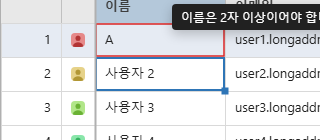
Checks for violations of a column’s declared validation rules. Automatically checked whenever an edit is committed, and shown with a red border (plus an error-message tooltip on hover). validateAll() is meant for a one-shot bulk check before saving, and, like autoFitColumns()/ printGrid(), only checks currently loaded (cached) rows.
const grid = new JHGrid({
  container: '#grid',
  fetchMeta, fetchData,
  editableCols: '*',
  columnDefs: [
    { field: 'email', validation: { required: true, pattern: /^\S+@\S+\.\S+$/ } },
    { field: 'age',   validation: { min: 0, max: 120 } },
    { field: 'code',  validation: { validator: (v) => v.startsWith('A') || 'Code must start with A.' } },
  ],
});

saveBtn.addEventListener('click', async () => {
  grid.validateAll();
  if (!grid.isValid()) {
    alert('Please check your input.');
    console.log(grid.getInvalidCells()); // { 3: { email: '...' } }
    return;
  }
  await fetch('/api/save', { method: 'POST', body: JSON.stringify(grid.getEdits()) });
});
validation.pattern accepts a RegExp or a string (compiled once). A string that is not a valid regular expression is reported once in the console and that rule is skipped; the other rules still apply. The pattern runs on whatever users type or paste, so avoid patterns prone to catastrophic backtracking (nested quantifiers such as (a+)+), and never build one from untrusted input.
getRowData(rowIndex) / ready()
grid.getRowData(3);            // row 3's current data (with unsaved edits applied; null if not loaded)
grid.getCellValue(3, 'name');  // one cell of it, same rules; null for an unknown field
grid.getTotalRows();           // rows the grid is showing right now, filters applied
await grid.ready();            // waits until the initial metadata/first chunk load completes
getTotalRows() counts what the grid shows: the filtered total, rows added with addRow() included and rows removed excluded, pinned copies aside. With pagination on it is the whole dataset, not the current page.
destroy()
Fully removes event listeners and DOM. Call this when unmounting a component or navigating away.
grid.destroy();