Data Source
A grid takes its rows from exactly one of these: an async backend pair, a single async callback, or an array you already have in memory.
Data Source Interface
Give the grid fetchMeta + fetchData for a backend that answers the two questions separately, fetchPage for one that answers both at once, or data for an array already in memory. Exactly one of the three is required, and the first two are called again whenever a filter, a sort or a scroll needs rows the grid does not have.
fetchMeta
fetchMeta: (state?: GridFilterState | null) => Promise<{
  totalRows: number;   // total number of rows in the dataset (after state's filters, if any)
  columns: string[];   // ordered list of column keys
}>
state is the sort/filter/quick-filter the grid wants applied, the same shape fetchData receives (see below). A fetchMeta that ignores it still works, it just always reports the unfiltered total, which makes the scrollbar/row count wrong the moment a filter or sort is active.
fetchData
fetchData: (page: number, size: number, state?: GridFilterState | null) => Promise<{
  rows: Record<string, unknown>[];  // `size` rows starting at offset page*size, honoring `state`
}>
interface GridFilterState {
  sorts:   { field: string; dir: 'asc' | 'desc' }[];
  // string = substring match (setFilter()); string[] = exact-match checkbox selection (setFilterValues())
  filters: Record<string, string | string[]>;
  quickFilter: string; // '' when inactive
}
JHGrid never filters or sorts data itself; it only tracks what the user asked for (which column, which values, which direction) and hands that to fetchMeta/fetchData as state on every call. Applying it (a WHERE/ORDER BY on a real backend, or an Array.filter/sort for an in-memory source) is entirely the host’s responsibility; a callback that ignores state simply never filters or sorts.
Row objects must use the same keys as the columns array returned by fetchMeta.
// fetchMeta → { "columns": ["name", "age", "city"] }
// fetchData → { "rows": [{ "name": "Alice", "age": 30, "city": "Seoul" }] }
How columns and columnDefs combine:
- The order of
columnDefswins. Columns the server reports thatcolumnDefsdoes not mention are appended after them, as plain text columns. - A
columnDefsentry whosefieldthe server did not report is ignored. - Without
columnDefs, the grid shows exactly the columnsfetchMetareports, in that order.
page is the 0-based index of a chunk of size rows, not a row number: page 2 with size: 300 is rows 600 to 899. size is the chunkSize option (or the page size when pagination is on).
const grid = new JHGrid({
  container: '#grid',
  editableCols: '*',
  fetchMeta: async (state) => {
    const res = await fetch('/api/users/meta', {
      method: 'POST',
      headers: { 'Content-Type': 'application/json' },
      body: JSON.stringify(state ?? {}),           // sorts, filters, quickFilter
    });
    return res.json();                             // { totalRows: 1250, columns: ['id', 'name', 'dept'] }
  },
  fetchData: async (page, size, state) => {
    const res = await fetch('/api/users/data', {
      method: 'POST',
      headers: { 'Content-Type': 'application/json' },
      body: JSON.stringify({ page, size, ...(state ?? {}) }),
    });
    return res.json();                             // { rows: [ { id: 1, name: 'Alice', dept: 'Sales' }, ... ] }
  },
});
Errors and retries. A fetchData call that rejects (a network error, an HTTP error you turned into a throw) is retried twice more, after 0.5 s and then 1 s. When the third attempt fails the grid shows i18n.loadError in a banner for a few seconds, calls onChunkError(err), and leaves that chunk empty for about 5 seconds before it will ask for it again. A response that is not shaped like { rows: [] } is reported the same way but not retried, since asking again cannot fix it. Check res.ok yourself, because fetch only rejects on network failure:
fetchData: async (page, size, state) => {
  const res = await fetch(`/api/users?page=${page}&size=${size}`);
  if (!res.ok) throw new Error(`HTTP ${res.status}`);   // retried, then onChunkError
  return res.json();
},
onChunkError: (err) => console.error('load failed', err),
A chunk that failed is not retried on sight: it stays empty for about five seconds, so a dead backend is asked once per chunk per five seconds rather than on every frame that scrolls over it. reloadData() and refresh() clear that cooldown, as does setDataSource().
The grid keeps at most two chunk requests in flight and holds new requests while the user is actively wheel-scrolling, so a fast scroll over a huge dataset asks only for the chunks it lands on.
fetchPage: single-callback alternative
For a backend that already returns a page of rows and the total count together in one round trip (e.g. a SQL COUNT(*) OVER() alongside the paged query), fetchPage collapses fetchMeta+fetchData into a single callback instead of two:
fetchPage: (page: number, size: number, state?: GridFilterState | null) =>
  Promise<{
    rows: Record<string, unknown>[];
    totalRows: number;
    columns?: string[]; // only needed if not already provided via columnDefs
  }>
const grid = new JHGrid({
  container: '#grid',
  columnDefs: [{ field: 'id' }, { field: 'name' }, { field: 'dept' }],
  fetchPage: (page, size, state) =>
    fetch('/api/grid', {
      method: 'POST',
      headers: { 'Content-Type': 'application/json' },
      body: JSON.stringify({ page, size, state }),
    }).then(res => res.json()), // { rows, totalRows }
});
The grid still asks for chunk 0 once at boot even though it needs both the row count and the rows from that same call, so a plain (page, size) => … implementation isn’t invoked twice for the same page. Only one data source applies: supplying fetchMeta/fetchData alongside fetchPage leaves those two in charge and fetchPage is ignored.
Local Array Data (data)
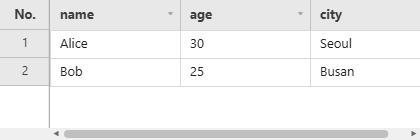
For a dataset that already fits in memory (prototyping, a small/medium lookup table, tests) pass a plain array via data instead of writing fetchMeta/fetchData yourself. Columns are inferred from columnDefs if given, else from the keys of data[0].
const grid = new JHGrid({
  container: '#my-grid',
  data: [
    { name: 'Alice', age: 30, city: 'Seoul' },
    { name: 'Bob',   age: 25, city: 'Busan' },
  ],
  editableCols: '*',
});
Filtering, sorting, and the quick filter are applied against the array directly (same semantics a server-backed fetchMeta/fetchData is expected to implement; see onFilter/onSort). This re-scans the whole array on every state change with no indexing, so it’s meant for small/medium datasets; a large dataset still belongs behind fetchMeta/fetchData against a real, indexed backend. refresh() and reloadData() re-read the same array reference, so mutating it externally and calling one of them picks up the change.
What the grid does with the array:
- Columns. With
columnDefs, only the declared fields become columns; a key of the rows that is not declared is not shown. Without it, the columns are the keys ofdata[0]. An empty array needscolumnDefs, otherwise the constructor throws. - Edits stay in the grid. Editing a cell never writes into your array. Read the changes with
getEdits()and apply them to your own data. - Text filter (
setFilter, the filter panel’s search box): case-insensitive substring match on that field. Set filter (setFilterValues, the checklist): exact match on the value as text. - Quick filter (
setQuickFilter): case-insensitive substring match against every value of the row object, including keys that have no column. - Sorting. Two numbers compare as numbers; a
type: 'date'column compares as dates read through its pattern, so'12/31/2019'sorts before'03/01/2020'underMM/DD/YYYY; anything else compares as text with numeric collation, so'item2'sorts before'item10'. Empty values, and a date value the pattern cannot read, compare as text.
const users = [
  { id: 1, name: 'Alice', dept: 'Sales',       salary: 5200 },
  { id: 2, name: 'Bob',   dept: 'Engineering', salary: 6100 },
  { id: 3, name: 'Chloe', dept: 'Sales',       salary: 4800 },
];

const grid = new JHGrid({
  container: '#grid',
  data: users,
  editableCols: ['name', 'salary'],
  columnDefs: [
    { field: 'id',     label: 'ID',     width: 60 },
    { field: 'name',   label: 'Name' },
    { field: 'dept',   label: 'Dept' },
    { field: 'salary', label: 'Salary', align: 'right' },
  ],
});

grid.setSort('salary', 'desc');     // Bob, Alice, Chloe
grid.setQuickFilter('sales');       // Alice, Chloe

// The array itself is untouched by edits. Merge them yourself before saving:
const edits = grid.getEdits();      // { 0: { salary: '5300' } }, row index -> field -> text
Ignored if fetchMeta/fetchData or fetchPage is also provided.
Changing the Data Source at Runtime (setDataSource)
setDataSource() points a running grid at a different source. It takes the same three shapes the constructor takes, and then starts over exactly as refresh() does - unsaved edits, filters, sorts, selection, column widths and order are dropped, because the new source need not even have the same columns.
grid.setDataSource({ fetchMeta, fetchData });        // another backend
grid.setDataSource({ fetchPage });                   // the single-callback shape
grid.setDataSource({ data: rows });                  // an array already in memory
await grid.ready();                                  // resolves once the first rows are in
Use reloadData() instead when the source is the same and only the data behind it changed: that keeps filters, sort and column state.
Columns declared in columnDefs stay declared: a source whose rows have other fields shows those columns empty. Leave columnDefs out to let each source bring its own columns.