Rows
Adding, removing, hiding, resizing and reordering rows, plus the pinned rows that stay visible above and below the scrolling area.
Methods documented here: addRow(), addRows(), autoFitColumns(), deleteRow(), getDeletedRows(), getHiddenRows(), hideRow(), hideRows(), isRowHidden(), showAllRows(), showRow(), getNewRows(), getPinnedRows(), getRemovedRows(), getRowHeight(), isRowPinned(), pinRow(), resetRowHeight(), setPinnedRows(), setRowHeight(), togglePinRow(), undeleteRow(), unpinRow().
Adding/Deleting Rows (addRow / deleteRow)

grid.addRow({ name: 'New', age: 0 });        // append at the end
grid.addRow({ name: 'New' }, { index: 0 });  // insert at the front

grid.addRows([{ name: 'A' }, { name: 'B' }]);              // append a batch, returns [index, ...]
grid.addRows([{ name: 'A' }, { name: 'B' }], { index: 2 }); // A at 2, B at 3

grid.deleteRow(3);      // marks row 3 as deleted (strikethrough, undoable)
grid.undeleteRow(3);    // clears the deletion mark

grid.getNewRows();      // rows added this session, use this to send new-insert requests to the server
grid.getDeletedRows();  // server indices of rows marked for deletion (see the note below)
By default deleteRow() marks a server row (dims it with a strikethrough, keeps it on screen, and reports it via getDeletedRows()) rather than removing it; this is the deleteMode constructor option, 'mark' by default. Pass { permanent: true } (or set deleteMode: 'permanent' for the whole grid) to take the row off the screen immediately instead:
grid.deleteRow(3, { permanent: true }); // removed from the screen right away
grid.getRemovedRows(); // server indices removed this way, separate from getDeletedRows()
grid.undeleteRow(3);   // brings a permanently-removed row back too
A row added via addRow() ignores all of this; it was never sent anywhere, so deleteRow() on it just removes it outright regardless of deleteMode.
addRows(rows, opts?) inserts a whole list as one undo step and one redraw, which is what calling addRow() in a loop does not do: a hundred calls leave a hundred undo steps behind and redraw a hundred times. index places the first row and the rest follow it in order; omitted, they all go to the end. It returns the index of each new row and ignores an empty list.
getDeletedRows()/getRemovedRows() report server indices, not screen positions: a row inserted above a marked one moves it down the screen, but not in what these two report. A server index is the row’s position in the result the server returned for the filter and sort in effect (what page * size + i counted in your fetchData), which for a data array with no filter or sort is simply the index into the array.
addRow() returns the new row’s index, and everything it does stays in the browser until you send it. getNewRows() gives each added row as it was when added; edits made to it afterwards are reported by getEdits() under its index (isNewRow(index) is true), and getRowData(index) returns the row with them applied.
A save button that sends updated/added/deleted rows together can either assemble that payload by hand from getEdits()/getNewRows()/getDeletedRows() as above, or — when rows have a stable key (most do) — call getChanges() instead, which does the same assembly keyed by that column:
saveBtn.addEventListener('click', async () => {
  grid.validateAll();
  if (!grid.isValid()) return alert('Fix the highlighted cells first.');

  const { updated, added, deleted } = grid.getChanges(); // requires the `rowKey` option

  const res = await fetch('/api/save', {
    method: 'POST',
    headers: { 'Content-Type': 'application/json' },
    body: JSON.stringify({ updated, created: added, deleted }),
  });
  if (res.ok) await grid.acknowledgeChanges(); // forgets the edits/adds/marks, re-reads the data
});
See Batch Save for what each of the three arrays looks like and the one case it doesn’t cover (deleteMode: 'permanent' rows).
Hiding Rows (hideRow / showRow / showAllRows)
Takes rows out of the view without deleting them. Right-click a row and pick Hide row, or call the methods; the row-number gutter marks the boundary rows were folded away at, and the same menu offers Show all hidden rows while any are hidden.
grid.hideRow(3);              // the row at index 3 leaves the view
grid.hideRows([0, 2, 5]);     // one undo step for the batch, returns how many were hidden

grid.getHiddenRows();         // [{ index: 3, key: '42' }] - index is the server index, key the rowKey value
grid.isRowHidden(3);          // by server index, not by the row index on screen

grid.showRow(3);              // one row back, by the server index above
grid.showAllRows();           // everything back, returns how many
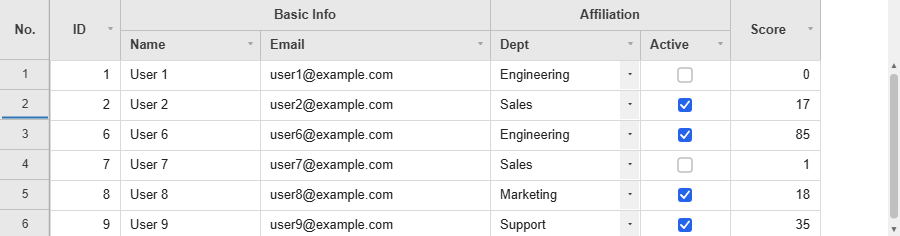
A hidden row leaves the grid the same way a permanently deleted one does, so every count and every export already leaves it out: getTotalRows(), the row indexes of the rows under it, a CSV export, and anything computed over the rows. It is not a change to save - it stays out of getChanges() and getRemovedRows(), and rides in getState() with the hidden columns.
Set rowKey. A sort, a filter or a reloadData() re-numbers every server row, so hidden rows are found again by their rowKey value as the new rows arrive. Without rowKey there is nothing stable to find them by and they come back visible (with one console warning).
| Hidden by | the server index at the time, and the rowKey value where there is one |
| Survives a sort/filter/reload | with rowKey; without it, the rows come back |
In getState() | yes, as hiddenRows: [{ index, key }] |
| In exports and totals | no - a hidden row is not in the view at all |
| A row added here and not saved yet | cannot be hidden (no identity to hide it by) - delete it instead |
rowContextMenuItems gates the menu entry under the name 'row-hide'.
Row Height (setRowHeight / autoFitColumns)

grid.setRowHeight(3, 40);   // changes only row 3's height to 40px
grid.setRowHeight(28);      // called with one argument, changes the default row height for all rows
grid.getRowHeight(3);
grid.resetRowHeight(3);     // resets that row back to the default height

grid.autoFitColumns('name', 'age'); // auto-resizes the given columns to fit their content (all columns if no argument)
Like isValid()/printGrid(), autoFitColumns() only computes against currently loaded (cached) rows.
Wrapped Cells and Auto Row Height (wrapCells / autoRowHeight)
wrapCells: true wraps a cell’s text onto as many lines as the column’s width needs instead of cutting it off with an ellipsis. autoRowHeight: true then gives each row the height its tallest cell needs. The two are separate options: wrapping without the height leaves the lines past the first clipped at the row’s bottom edge, with the last visible line ending in an ellipsis.
<div id="my-grid" style="width: 620px; height: 250px"></div>

<script type="module">
import { JHGrid } from '@jh-grid/jhgrid-js';

const grid = new JHGrid({
  container: '#my-grid',
  wrapCells: true,
  autoRowHeight: true,
  columnDefs: [
    { field: 'id',   label: 'ID',    width: 60, align: 'right' },
    { field: 'name', label: 'Owner', width: 90 },
    { field: 'note', label: 'Note',  width: 300 },
  ],
  data: [
    { id: 1, name: 'Alice', note: 'A single long sentence that has to wrap across more than one line inside this column' },
    { id: 2, name: 'Bob',   note: 'Short' },
    { id: 3, name: 'Chloe', note: 'Line one\nline two, written with an explicit line break' },
  ],
});
</script>
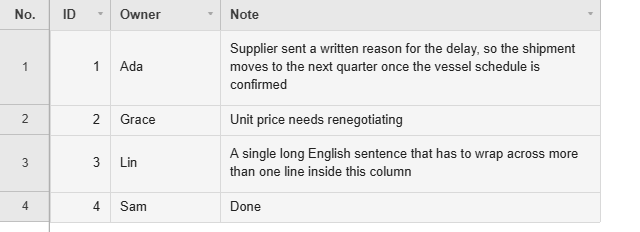
- A word wider than the column is broken across lines, so text with no spaces in it (Korean, Japanese, Chinese) wraps the same way a spaced sentence does.
- Explicit line breaks in a value still break lines, with or without
wrapCells.autoRowHeightcounts them too, so a value pasted in with line breaks arrives at the right height instead of needing a double-click to fit. - Heights are measured against the column widths of the moment: dragging a column narrower, calling
autoFitColumns()or a container resize underresponsivere-measures the rows that are loaded. - Editing a cell re-fits its row, both ways - a longer value grows it, a shorter one gives the space back.
- A row you set yourself with
setRowHeight(), or the user drags from the row-number gutter, keeps that height and is left out of the measuring.
How many rows get measured. Up to 5,000 rows, every loaded row is measured, so the total height is exact and the scrollbar never moves on its own. Past that the grid measures a window around the viewport instead - the rows on screen and 50 either side - and leaves the rest at the default height, giving back the heights of rows that have scrolled far away. That keeps the row-height model sparse (one height for every row of a million would turn each change into a sort of the whole dataset), and the cost is the honest one: the scrollbar shifts a little as taller rows come into view. If that matters more than fitted rows, leave autoRowHeight off above 5,000 rows and fit the rows you need with setRowHeight(), or a double-click on the bottom edge of a row number. wrapCells has no cap either way: it draws what is on screen, at any row count.
Summary Row (summaryRow)
A grand total row pinned above or below the data, which stays put while the rows scroll.
const grid = new JHGrid({
  container: '#my-grid',
  rowKey: 'id',
  summaryRow: {
    position: 'bottom',                             // 'top' | 'bottom' | 'both'
    aggregates: { salary: 'sum', score: 'avg' },    // sum | avg | min | max | count | fn(rows, field)
    label: 'Total', labelField: 'name',
  },
  data: rows,
});

grid.getSummaryValues();        // { salary: 412000000, score: 81.4 }
grid.getSummaryStats();         // { rows, missing, capped, source }
grid.getSummaryRowIndex();      // the row index it sits at
grid.setSummaryValues({ salary: 412000000 });   // totals from the server instead; null computes again
grid.refreshSummary();          // recompute now
- The row is an ordinary pinned row, added after anything the host pinned, so
pinnedTopRowsandpinnedBottomRowskeep the indices they had. - The numbers cover the rows the grid is showing, filters included. An edit, a sort, a filter or new rows arriving all update them. An edit is applied to the running totals rather than counting every row again - on 200,000 rows that is 0.02ms instead of 23ms per edit - except where the arithmetic cannot be undone: a
min/maxwhose extreme value was the one edited, a function aggregate, or totals you supplied withsetSummaryValues(). Those still recount, as before. - A function aggregate gets
(rows, field)and can return anything, text included. labelgoes inlabelField(the first column by default), and defaults to the word for a total in the grid’slocale.backgroundshades the row ('#f1f5f9'by default,nullleaves it unpainted). AcellBackgroundof your own still wins wherever it returns a colour.- A server-backed grid only holds the chunks it has fetched, so a total over a half-loaded table would be a plausible-looking wrong number. Those are left blank, with one warning, unless
allowPartial: true;setSummaryValues()is the path for a server that totals properly. - Past
maxRows(200,000 by default) nothing is totalled andgetSummaryStats().cappedsays so. -
rowsandexcludeRowhand the choice of records to you, for a grid whose rows on screen are a shaped view of something you hold yourself.rows()returns the records to total instead of the rows the grid shows;excludeRow(rowData, rowIndex)drops a row that is on screen but is not data, such as a header row that already carries a subtotal of its own.summaryRow: { aggregates: { amount: 'sum' }, rows: () => myRecords, // total these, not what is on screen excludeRow: (row) => row.isSectionHead, // and leave these out }
Row Drag Reorder (rowReorder)
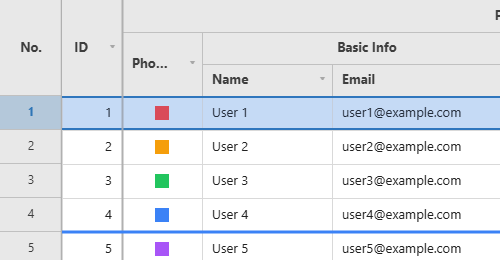
Drag rows by the row-number gutter to reorder them. Unlike column reordering, row data isn’t always resident in memory under server-side paging, so enabling this scans the entire dataset once (it’s an opt-in feature).
const grid = new JHGrid({
  container: '#grid',
  fetchMeta, fetchData,
  rowReorder: true,
  onRowReorder: (fromIndex, toIndex, rowData) => console.log(fromIndex, '→', toIndex),
});
What to expect:
- After a drop the grid shows the new order at once, but only in the browser. A sort, a filter,
refresh()orreloadData()fetches from your server again, soonRowReorderis where you save the order (toIndexis where the row ended up,fromIndexwhere it was). - Like a sort, a drop discards the state keyed by row index (edits, selection, undo history), and asks with a
window.confirm()first when a server row has an unsaved edit. - Dragging starts working once the full scan has finished, so on a big dataset it is not available the instant the grid appears. Rows added with
addRow()and pinned rows cannot be dragged.fullScanPageSizeandfullScanConcurrencytune the scan.
new JHGrid({
  container: '#grid',
  fetchMeta, fetchData,
  rowReorder: true,
  onRowReorder: (fromIndex, toIndex, rowData) => {
    fetch(`/api/tasks/${rowData.id}/move`, {
      method: 'POST',
      headers: { 'Content-Type': 'application/json' },
      body: JSON.stringify({ toIndex }),
    });
  },
});
Space Under a Row (reserveRowSpace / getRowRect)
reserveRowSpace(rowIndex, height) keeps a strip under a row’s cells that the grid lays out but never draws in, and that clicks pass through. The row grows, everything below it moves down, and the strip is yours to cover with your own element - enough on its own for an inline chart, a form, a detail panel or a second grid under the row.
const grid = new JHGrid({ container: '#grid', data: rows, columnDefs });
const panel = document.createElement('div');
panel.style.position = 'absolute';
document.querySelector('#grid').appendChild(panel);

let openRow = null;

function place() {                         // the grid redraws on scroll, sort, resize ...
  const rect = openRow == null ? null : grid.getRowRect(openRow);
  if (!rect || !rect.visible || rect.reservedHeight === 0) { panel.style.display = 'none'; return; }
  Object.assign(panel.style, {
    display: 'block',
    left:   `${rect.left}px`,
    top:    `${rect.reservedTop}px`,
    width:  `${rect.width}px`,
    height: `${rect.reservedHeight}px`,
  });
}
grid.on('render', place);                  // ... and this puts the panel back each time

function open(rowIndex) {
  if (openRow != null) grid.reserveRowSpace(openRow, 0);
  openRow = rowIndex;
  grid.reserveRowSpace(rowIndex, 180);
  panel.textContent = JSON.stringify(grid.getRowData(rowIndex));
}
| API | What it answers |
|---|---|
reserveRowSpace(rowIndex, height) | Keeps height pixels under that row. 0 gives them back |
getReservedRowSpace(rowIndex) / getReservedRows() | What is reserved where |
getRowRect(rowIndex) | { top, height, reservedTop, reservedHeight, left, width, visible } in pixels relative to the grid element |
getViewportRect() | The scrollable band, for clipping your element so it cannot cover the header, a pinned row or the scrollbars |
What to expect:
- The strip is not part of the row’s cells:
getRowHeight()still reports the cell height,setRowHeight()still sets it,autoRowHeightstill measures text as if the strip were not there, and an editor covers the cells only. - Clicks in the strip do not select or edit a cell, so your element gets them.
- The row background is painted under the strip; nothing else is. Put an opaque element over it.
- A row with space reserved cannot be drag-reordered - the panel is placed from the row’s index.
- Pinned rows cannot reserve space.
- The layout moves at once, so
getRowRect()straight after the call is already correct, while the repaint waits for the next frame. Reserving space for twenty rows in a loop therefore costs one repaint, not twenty.
A Row’s Edits, Before and After (getRowChanges)
getRowChanges(rowIndex) pairs each edited field with the value it had, which is the shape an audit entry or a “save these changes?” dialog wants. Null when that row has no unsaved edit.
grid.setCellValue(3, 'qty', '99');
grid.getRowChanges(3);                  // { qty: { before: '10', after: '99' } }
grid.getRowChanges(3, { typed: true }); // { qty: { before: 10, after: 99 } }
typed runs the column’s own parse on both sides, the same way getEdits({ typed: true }) does. The two halves used to come from different calls - getOriginalRowData() and getEdits() - and lining them up was left to you.
Dragging Rows Between Grids (rowDragGroup)
Give two grids the same rowDragGroup name and a row can be dragged by the row-number gutter out of one and into the other. The grid it lands on draws the drop line; the grid it came from keeps the row shaded until the button comes up.
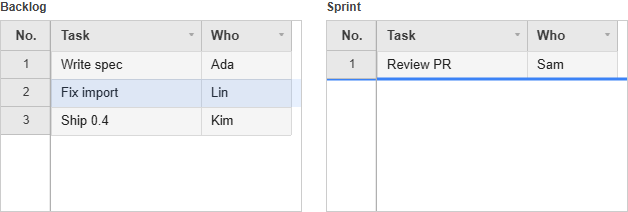
import { JHGrid } from '@jh-grid/jhgrid-js';

const columnDefs = [{ field: 'task', label: 'Task' }, { field: 'who', label: 'Who' }];

const backlog = new JHGrid({
  container: '#backlog',
  rowDragGroup: 'tasks',
  columnDefs,
  data: [
    { task: 'Write spec', who: 'Ada' },
    { task: 'Fix import', who: 'Lin' },
  ],
});

const sprint = new JHGrid({
  container: '#sprint',
  rowDragGroup: 'tasks',
  columnDefs,
  data: [{ task: 'Review PR', who: 'Sam' }],
  onRowDropIn: ({ rowData, toIndex }) => console.log('took', rowData.task, 'at', toIndex),
});
The drop is made of the two public row APIs, which is what makes it saveable:
- the receiving grid runs
addRow(rowData, { index: toIndex }), so the row shows up in itsgetNewRows()andgetChanges().added; - the sending grid runs
deleteRow(rowIndex), so the row shows up in itsgetDeletedRows()andgetChanges().deleted. With the defaultdeleteMode: 'mark'the row stays visible, struck through, until that grid’s host saves and reloads. SetdeleteMode: 'permanent'on the sending grid to have it leave the view at once.
Each host saves its own half; the grid never talks to a server for you.
| Callback | Fires on | Return value |
|---|---|---|
onRowDragOut({ grid, toGrid, rowIndex, rowData, toIndex }) | the grid the row is leaving | false calls the whole move off |
onRowDropIn({ grid, fromGrid, rowData, toIndex }) | the grid receiving it | false refuses the row; a row object is inserted in place of the one that arrived |
onRowDropIn returning an object is where two grids with different columns meet:
onRowDropIn: ({ rowData }) => ({ title: rowData.task, assignee: rowData.who, state: 'todo' }),
What to expect:
- Dragging out does not need
rowReorder. Only the one row travels, so the full scan that option starts is not involved. SetrowReorder: trueas well when the same grid should also reorder within itself; then a drop inside its own canvas reorders and a drop on a sibling moves. - Rows added with
addRow()and not saved yet, and pinned rows, cannot be dragged - as with row reorder. - Grids with different
rowDragGroupnames ignore each other, and so does a grid with no group. - The move is announced through the live region, in the wording of
i18n.rowDragOutAnnounce.
Moving a Row from Code (moveRow)
moveRow(from, to) does what the drag above does, from code. to is where the row ends up, so moveRow(5, 0) puts row 5 first, and the number matches the toIndex that onRowReorder reports.
const grid = new JHGrid({
  container: '#grid',
  fetchMeta, fetchData,
  rowReorder: true,
  onRowReorder: (fromIndex, toIndex, rowData) => saveOrder(rowData.id, toIndex),
});

document.querySelector('#to-top').addEventListener('click', async () => {
  const [row] = grid.getSelectedRows();
  if (row != null) await grid.moveRow(row, 0);
});
What to expect:
- It goes through the same path as the drag, so
onRowReorderfires, the live region announces the move, and the state keyed by row index (edits, selection, undo history) is discarded. An unsaved edit on a server row asks withwindow.confirm()first; keeping the edit leaves the order as it was and the call answersfalse. - It needs
rowReorder: true, and awaiting it covers the full scan that option starts - so on a large server-backed grid the first call takes as long as that scan and the ones after it are immediate. That is why it returns a promise. - Rows added with
addRow()and pinned rows cannot be moved, as with the drag. A row index outside the server rows, or a non-integer, throws. - Like the drag, the new order lives in the browser only.
onRowReorderis where you persist it.
Pinned Rows (pinnedTopRows / pinnedBottomRows / pinRow)
Pins one or more rows so they stay fixed at the top or bottom of the viewport, detached from scrolling, sorting, and filtering entirely — the typical use is a totals/summary row that must never be sorted away with the rest of the data.
Pinned rows are their own small data source, not a live view into the main dataset — pinning takes a snapshot of the row data at that moment. Editing a pinned cell edits only the pinned copy; onCellChange still fires normally, so sync it back yourself if that’s what you want. This is the only implementable shape given the grid has no stable row-id concept and can’t fetch an arbitrary row from an unfetched server page.
// Supply pinned rows directly, e.g. a host-computed totals row:
const grid = new JHGrid({
  // ...
  pinnedBottomRows: [{ name: 'Total', amount: 48200 }],
});

// Or pin a row that's already visible/loaded:
const handle = grid.pinRow(2, 'top');   // snapshots getRowData(2); null + console.warn if row 2 isn't loaded yet
grid.unpinRow(handle);                  // false if the handle is stale (band already mutated since)

grid.getPinnedRows('top');              // current pinned-top data, edits merged in
grid.setPinnedRows([{ name: 'Total', amount: 48200 }], 'bottom'); // wholesale replace
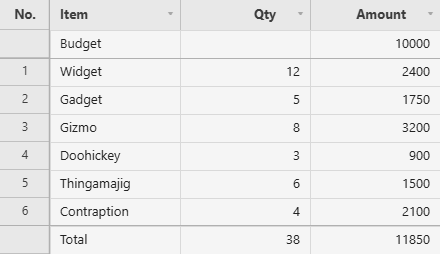
The grid in the image, with the totals computed from the data:
const items = [
  { name: 'Widget', qty: 12, amount: 2400 },
  { name: 'Gadget', qty: 5,  amount: 1750 },
  // ...
];
const totalQty    = items.reduce((sum, r) => sum + r.qty, 0);
const totalAmount = items.reduce((sum, r) => sum + r.amount, 0);

const grid = new JHGrid({
  container: '#grid',
  data: items,
  columnDefs: [
    { field: 'name',   label: 'Item' },
    { field: 'qty',    label: 'Qty',    align: 'right' },
    { field: 'amount', label: 'Amount', align: 'right' },
  ],
  pinnedTopRows:    [{ name: 'Budget', qty: '', amount: 10000 }],
  pinnedBottomRows: [{ name: 'Total',  qty: totalQty, amount: totalAmount }],
});
A bottom band sits at the bottom of the viewport, not under the last row: with fewer rows than fit, the gap between them is empty, exactly as a fixed table footer behaves. Size the grid to its content if you would rather not see that gap.
When the data changes, recompute and replace the row rather than mutating it, since the pinned rows are a copy:
grid.setPinnedRows([{ name: 'Total', qty: newQty, amount: newAmount }], 'bottom');
Letting users pin rows
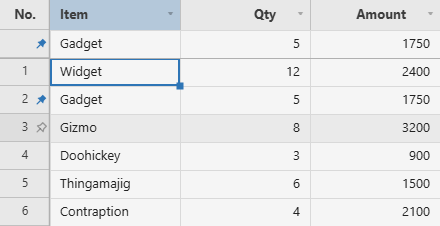
The row-number gutter’s right-click menu already has Pin row to top, Pin row to bottom and Unpin row for every row that comes from the data. rowContextMenuItems switches them off (leave 'row-pin' out of the list). For a one-click alternative, rowPinButton draws a pin at the right edge of the gutter: an outlined pin appears while the pointer is over a row, and clicking it pins a copy of that row. A row that has been pinned shows a filled pin, both on the original row and on its pinned copy, and clicking either unpins it.
const grid = new JHGrid({
  container: '#grid',
  data: items,
  rowPinButton: true,          // or 'top' (same as true) / 'bottom' to pin into the bottom band
  onRowPinToggle: ({ pinned, rowIndex, position, rowData, handle }) => {
    console.log(pinned ? 'pinned' : 'unpinned', rowData.name, 'at the', position);
  },
});
- The icon needs the row-number column: with
showRowNumbers: falseit is ignored and a console warning says so. It also needstheme.hoverRowBgto show the outlined pin on hover; the filled pin of an already-pinned row is always drawn. - Rows that you supplied, through
pinnedTopRows/pinnedBottomRows/setPinnedRows()(a totals row, say), are not user pins. They get no icon and no menu, so the user cannot remove them. Pins restored bysetState()count as yours as well. onRowPinToggleruns after the user’s own pin or unpin, once the change is already applied. It does not run forpinRow(),unpinRow()ortogglePinRow()called from code.rowDatais the row at that moment (edits of a pinned row included) androwIndexits index then; treat both as a snapshot, sincerowIndexmeans nothing once the data reloads.
The pin is a copy, so the original stays in the body. If you want “move” behaviour instead, take the original out of your own data in onRowPinToggle and reload, then put it back on unpin:
const all  = [ /* every row, each with a unique id */ ];
const rows = [...all];                       // the array the grid reads
const pinnedIds = new Set();

const grid = new JHGrid({
  container: '#grid',
  data: rows,
  rowPinButton: true,
  onRowPinToggle: ({ pinned, rowData }) => {
    if (pinned) pinnedIds.add(rowData.id); else pinnedIds.delete(rowData.id);
    rows.splice(0, rows.length, ...all.filter((r) => !pinnedIds.has(r.id)));
    grid.reloadData();                       // the pinned copies are untouched by the reload
  },
});
From code, isRowPinned() and togglePinRow() complement pinRow() / unpinRow():
grid.isRowPinned(2);                 // true for a row that has a pinned copy, and for the copy itself
grid.togglePinRow(2);                // pins row 2 to the top, or unpins it if it is pinned already
grid.togglePinRow(2, 'bottom');      // same, pinning to the bottom band
isRowPinned() recognises a row by the object it was copied from, so a row that was evicted from the cache and fetched again reads as unpinned. togglePinRow() returns the new handle when it pinned, and null when it unpinned or the row is not loaded. Both are undoable.
Multiple pinned rows stack in array order, closest to the header/footer first. Internally each pinned row is addressed by an encoded visual row index — negative for pinned-top, >= totalRows for pinned-bottom — so row arguments/return values across the API (getRowData, setCellValue, onCellChange, onRowSelect, cellTooltip, …) may be negative or out-of-range for a pinned row; treat row as an opaque handle to pass back into getRowData/setCellValue, not as a position in the main dataset.
What works the same as a normal row: cell rendering/editing (respecting editableCols), row selection (click/ctrl-click; a shift-click spanning a pinned/normal row falls back to toggling just the clicked row instead of range-filling), cellDecorator/cellTooltip/cellContextMenuExtraItems, frozen columns, and undo/redo (both cell edits and pin/unpin/setPinnedRows itself).
Deliberately not supported in this version: per-row height/auto-grow (pinned rows always render at rowHeight), row resize, row drag-reorder (as source or drop target), the row-number gutter’s context menu (apart from the unpin item on a row the user pinned), the fill-handle, the keyboard “row focus” mode (← from the first column), and drag range-select spanning into or out of a pinned band (a range selection stays within one band). Arrow-key navigation does work between a pinned band and the scrollable page — stepping off the near edge of one lands on the near edge of the other. cellDecorator’s rowIndex and cellBackground’s row argument report a 0-based index local to the pinned band for a pinned row, not the encoded index seen elsewhere — use rowData to identify the row instead.