Editing
Inline editing: how the editor behaves, and what happens to a value that fails validation.
Editor Options (columnDefs[].editorOptions)
Each built-in editor is a CellEditors entry, chosen by the column’s type or named with editor: 'key'. editorOptions are handed to it:
| Editor key | Chosen by | editorOptions |
|---|---|---|
text | type: 'text' (the default) | none |
textMultiline | automatically for a value that contains a line break, or editor: 'textMultiline' | none |
date | type: 'date' | mode: 'date' (default) or 'datetime-local', used when the column’s format is 'locale'. min / max: limits for the native picker, as 'YYYY-MM-DD' text. See Date Columns |
number | editor: 'number' | decimals (default 0), min / max (default none), step (default 1, used by Arrow Up and Down), allowNegative (default true). Digits only, one decimal separator, and what is committed is rounded and clamped. An empty cell stays empty rather than becoming 0 |
dropdown | type: 'dropdown' | options: replaces the column’s options |
multiselect | type: 'multiselect' | options as above, and delimiter (default ',') |
richtext | type: 'richtext' | marks: which toolbar buttons to offer, from 'bold', 'italic', 'underline', 'strike' (default all four) |
columnDefs: [
  // A bold/italic-only rich text column.
  { field: 'summary', type: 'richtext', editorOptions: { marks: ['bold', 'italic'] } },
  // A multiselect that joins with a semicolon instead of a comma.
  { field: 'skills', type: 'multiselect', options: ['js', 'sql', 'go'], editorOptions: { delimiter: ';' } },
  // Quantities: whole numbers, never negative, Arrow Up/Down steps by ten.
  { field: 'qty', editor: 'number', editorOptions: { min: 0, step: 10 } },
  // Rates to two places, negatives allowed.
  { field: 'rate', editor: 'number', editorOptions: { decimals: 2 } },
  // Use the date editor on a column that is otherwise plain text.
  { field: 'hired', editor: 'date' },
],
To register an editor of your own under a key, or to write one inline, see Column Types below.
Validation (columnDefs[].validation)
Rules are declared per column and checked whenever a cell’s value is committed: an edit, a paste, a fill, a clear with Delete, setCellValue() / setCellValues(), and undo / redo. A cell that fails is outlined in red (theme.invalidCellBorder) and its message appears in a tooltip while the pointer rests on it. Validation reports; it never blocks the edit, so the invalid value is kept until the user fixes it.
| Rule | Type | Fails when |
|---|---|---|
required | boolean | the value is empty once trimmed |
pattern | RegExp \| string | the value does not match. A string is compiled as a regular expression |
min / max | number | Number(value) is below / above the limit, or the value is not a number. On a type: 'date' column the limits are date strings, and the value is compared as a date, read through the column’s format when it has one |
minLength / maxLength | number | the text is shorter / longer than the limit |
validator | (value, rowData) => boolean \| string | it returns false (the default message, or message) or a string (that string is the message). value is the cell text and rowData the row with edits applied. An exception is logged and counts as valid |
message | string | not a rule: it replaces the default message of every rule above |
An empty value only ever fails required; every other rule is skipped for it. The rules run in the order of the table and the first one that fails supplies the message. The default messages come from i18n (validationRequired, validationPattern, validationMin, validationMax, validationMinLength, validationMaxLength, validationInvalid) and follow locale.
const grid = new JHGrid({
  container: '#grid',
  editableCols: '*',
  data: [{ email: 'ada@example.com', age: '36', code: 'A-100', due: '2025-03-14', ticket: 'TCK-7' }],
  columnDefs: [
    { field: 'email',
      validation: { required: true, pattern: /^\S+@\S+\.\S+$/, message: 'Enter a valid email.' } },
    { field: 'age',    validation: { min: 0, max: 120 } },
    { field: 'code',   validation: { validator: (v) => v.startsWith('A') || 'Code must start with A.' } },
    { field: 'due',    type: 'date',
      validation: { min: '2025-01-01', max: '2025-12-31', message: 'Pick a date in 2025.' } },
    // A rule that looks at the rest of the row:
    { field: 'ticket', validation: { validator: (v, row) => row.code ? true : 'Fill in Code first.' } },
  ],
  // Fired each time a cell's validity changes; message is null when it became valid.
  onValidationError: (row, field, message) => console.log(row, field, message),
});
A date column with a format takes its limits the same way. Here the value is YY/MM/DD text and the limits are ISO dates:
{ field: 'due', type: 'date', format: 'YY/MM/DD',
  validation: { min: '2025-01-01', max: '2025-12-31', message: 'Pick a date in 2025.' } },
Besides the declared rules, a dropdown or multiselect value outside its options, and a date that does not fit its format, are flagged without any validation block. To gate a save on all of it, call validateAll(), then isValid() / getInvalidCells() - see below - and keep in mind that only rows already loaded into the browser are checked.
Text Cells and Line Breaks
A plain text cell edits in a single-line box. Alt+Enter inserts a line break (a plain Enter commits and moves down), and from then on the cell edits in a multi-line box. When a value with a line break is entered, the row grows to show every line. Rows that arrive with multi-line values already in the data start at the normal height and clip them, so double-click the bottom edge of the row number to fit the row to its tallest cell, or call setRowHeight(). A row too short for its lines shows whole lines from the top and ends the last visible one in an ellipsis. To have the grid wrap long lines and size the rows itself, see Wrapped Cells and Auto Row Height.
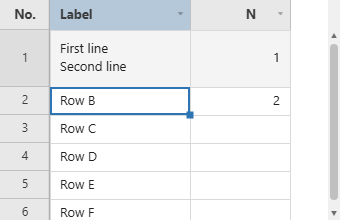
A value with line breaks is copied to the clipboard in quotes, the way a spreadsheet does, so it pastes back as one cell. To use the multi-line box from the first keystroke (say, a notes column whose values start empty), name it as the editor:
columnDefs: [
  { field: 'note', label: 'Note', width: 220, editor: 'textMultiline' },
],