Localization
Pick a bundled locale with locale, or pass your own strings through i18n.
Locale / Internationalization (locale / i18n)
Setting locale switches both the built-in UI text pack (currently Korean/Japanese/Simplified Chinese are bundled) and the default locale for the number/date/currency cell renderers. Use i18n to override specific strings on top of that.
import { JHGrid, KO_I18N } from '@jh-grid/jhgrid-js';

const grid = new JHGrid({
  container: '#grid',
  fetchMeta, fetchData,
  locale: 'ko',                 // or 'ko-KR' (defaults to 'en-US')
  i18n: { ...KO_I18N, loading: 'Loading…' }, // override specific strings only
});
The same grid with Korean UI text (the row-number header reads 번호, menus and panels follow) and number/date/currency cells formatted for the locale:
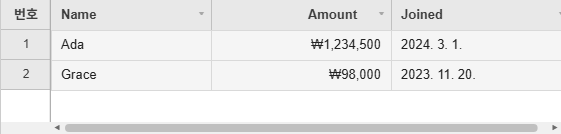
import { JHGrid, CellRenderers } from '@jh-grid/jhgrid-js';

const grid = new JHGrid({
  container: '#grid',
  locale: 'ko',
  data: [
    { name: 'Ada',   price: 1234500, joined: '2024-03-01' },
    { name: 'Grace', price: 98000,   joined: '2023-11-20' },
  ],
  columnDefs: [
    { field: 'name',   label: 'Name' },
    { field: 'price',  label: 'Amount', align: 'right', renderer: CellRenderers.currency({ currency: 'KRW' }) },
    { field: 'joined', label: 'Joined', renderer: CellRenderers.date({ format: 'locale' }) },
  ],
});
locale decides how amounts and dates are written, not which currency: currency() defaults to 'KRW' whatever the locale, so pass currency explicitly for anything other than won.
Besides the number, date and currency renderers, locale selects the text of the built-in messages and menus (see the reference below). A type: 'date' column that sets no format of its own follows it too, through the pack’s dateFormat ('MM/DD/YYYY' for en, 'YYYY-MM-DD' for ko, 'YYYY/MM/DD' for ja and zh). Write the column’s format out to pin it to one pattern whatever the locale, or ask for format: 'locale' to have Intl write the date - see Date Columns.
Text Reference (i18n)
Every string the grid shows comes from a text pack, and i18n overrides individual entries. The pack is chosen from the first part of locale ('ko', 'ko-KR' and 'KO' all pick Korean); English, Korean (ko), Japanese (ja) and Simplified Chinese (zh) are built in, and any other tag falls back to English. The packs are also exported as KO_I18N, JA_I18N and ZH_I18N for spreading into your own overrides. A key you leave out keeps the pack’s text; a value that is a function receives the arguments listed below.
import { JHGrid, JA_I18N } from '@jh-grid/jhgrid-js';

new JHGrid({
  container: '#grid',
  data: rows,
  locale: 'ja',
  i18n: {
    ...JA_I18N,                                            // optional: the pack is applied anyway
    noData:             'Nothing to show yet.',
    validationRequired: (col) => `${col} must not be empty.`,
    pagerPageLabel:     (page, pageCount) => `${page} / ${pageCount}`,
  },
});
The keys, with the English text:
| Area | Key | English text / arguments |
|---|---|---|
| States | loading | Loading… |
loadError | ⚠ Failed to load data. (banner after a request failed its retries) | |
noData | No data to display. | |
emptyCell | Empty cell (spoken for an empty cell, and the label of an empty value in filter lists) | |
ariaGrid | Data grid (used when ariaLabel is not set) | |
rowNumberLabel | No. (header of the row-number column) | |
| Clipboard | pasteTruncated(n) | n value(s) did not fit and were not pasted |
copyIncomplete(n) | n row(s) hadn't loaded yet and were not copied | |
| Editing | unsavedEditsWarning | the confirm() text shown before a filter or sort discards edits |
editAriaLabel(col, row) | Edit col, row row | |
richtextToolbarLabel | Formatting (accessible name of the rich-text editor’s toolbar) | |
| Filter / sort panel | sortAsc, sortDesc | ↑ Ascending, ↓ Descending |
sortShiftHint | Shift+click: add to multi-sort | |
filterDialog(col) | col Filter (the panel’s accessible name and title) | |
filterLabel, filterPlaceholder | Search, Enter search term… | |
filterApply, filterReset, filterResetAll, filterClose | Apply, Reset, Reset all filters, Close | |
filterValuesLabel, filterSelectAll | Filter by value, (Select all) | |
filterTagPlaceholder | Search values… | |
filterTagLocalScope, filterTagNoMatch, filterTagAllSelected | From loaded rows only, No matching values, All matches already selected | |
filterTagMinChars(n), filterTagMore(n) | Type at least n characters, +n more - narrow the search | |
filterTagSelected(n), filterTagContains(q), filterTagRemove(v) | Selected (n), Contains "q", Remove v | |
| Column menu | colFreeze, colUnfreeze | Freeze columns to the left, Unfreeze columns to the left |
colFreezeRight, colUnfreezeRight | Freeze columns to the right, Unfreeze columns to the right | |
colVisibility | Column visibility… | |
colInsertLeft, colInsertRight | Insert column left, Insert column right | |
colDelete, colUndelete | Delete column, Undo delete | |
| Column chooser | colChooserTitle, colChooserApply, colChooserCancel, colChooserSelectAll | Column Visibility, Apply, Cancel, Select all |
| Insert-column dialog | colInsertTitle, colInsertPlaceholder | Add column, Column name |
colInsertConfirm, colInsertCancel | Add, Cancel | |
| Row menu | rowInsertAbove, rowInsertBelow | Insert row above, Insert row below |
rowInsertTop, rowInsertBottom | Insert row at top, Insert row at bottom | |
rowDeleteMark, rowDeletePermanent, rowDelete, rowUndelete | Mark row for deletion, Delete row permanently, Delete row, Undo delete | |
rowPinTop, rowPinBottom, rowUnpin | Pin row to top, Pin row to bottom, Unpin row (also the pin icon’s tooltip) | |
rowHide, rowShowAll | Hide row, Show all hidden rows | |
rowAddEnd | Add row (not shown by the grid: a label for an add-row button of your own) | |
| Validation | validationRequired(col), validationPattern(col), validationInvalid(col) | col is required., col format is invalid., col is invalid. |
validationMin(col, min), validationMax(col, max) | col must be at least min., col must be at most max. | |
validationMinLength(col, len), validationMaxLength(col, len) | col must be at least len characters., ... at most len characters. | |
| Dates | dateFormat | MM/DD/YYYY (the default format of a type: 'date' column that sets none; YYYY-MM-DD in the ko pack, YYYY/MM/DD in ja and zh) |
| Summary row | summaryLabel | Total (the label summaryRow puts in labelField when the option sets no label) |
| Pager | pagerFirst, pagerPrev, pagerNext, pagerLast | First page, Previous page, Next page, Last page |
pagerPageSize, pagerPageLabel(page, pageCount) | Rows per page, Page page of pageCount | |
| Export | exportCsvFilename, printButton | export.csv, Print |
| Screen readers | announceCell(row, col, value) | Row row, col: value |
columnHeaderAnnounce(col), rowHeaderAnnounce(row) | spoken when a header or row number takes keyboard focus | |
sortAppliedAnnounce(col, dir), filterAppliedAnnounce(col), filterClearedAnnounce(col) | spoken after the panel applies a sort or filter | |
allFiltersClearedAnnounce, rowsSelectedAnnounce(n), rowReorderAnnounce(from, to), rowDragOutAnnounce(from, to) | spoken after a reset, a row selection change, a row drag-reorder, a row dragged out to another grid |