Interaction Reference
What a click, a drag or a key does. Everywhere below, Ctrl also means Cmd on a Mac.
Mouse
Cells
| Action | Result |
|---|---|
| Click a cell | Selects that cell (blue border). onCellClick fires |
| Click a checkbox cell | Toggles it at once, if the column is editable |
| Click a circle in a radio cell | Picks that option, if the column is editable (Space moves to the next one) |
| Click a button column cell | Runs its onClick, whatever editableCols says. No selection border is drawn |
Click a cell’s cellButton hotspot | Runs that button’s onClick and does not start an edit |
| Click an already-selected dropdown or multiselect cell | Opens its option list |
| Shift+click a cell | Extends the selection into a range from the last-selected cell |
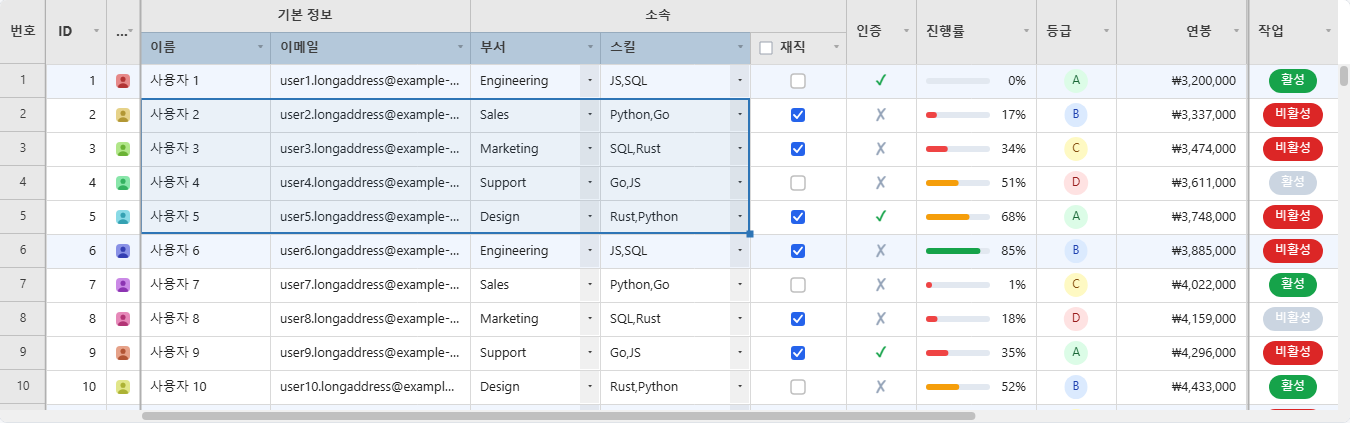
| Drag across cells | Selects a range (blue border + translucent overlay). Dragging past the edge of the grid scrolls it |
| Double-click a cell | Starts editing it, if the column is editable. onCellDoubleClick fires either way |
| Drag the small square at the corner of a selection | Fills the dragged-over cells from the selection, in any direction. See Filling |
| Right-click a cell | Opens the cell menu. A right-click inside the current selection keeps the selection |
| Rest the pointer on a cell | A tooltip after about half a second if the text is cut off, at once for a validation error or cellTooltip |
| Move the pointer over a row | Highlights the row (theme.hoverRowBg) |
Headers
| Action | Result |
|---|---|
| Click a column header | Selects the whole column. Shift+click extends it across columns |
| Click a header’s filter icon | Opens the filter / sort panel for that column |
| Click Asc / Desc in that panel | Sorts by that column alone |
| Shift+click Asc / Desc in that panel | Adds that column to the current sort; the panel shows each column’s priority as #1, #2, … |
| Click a header checkbox | Toggles it and calls onHeaderCheckboxChange |
| Drag a column header | Reorders the column; the columns in between slide out of the way. Escape puts it back |
| Drag a column header’s right border | Resizes the column (30 px at the narrowest) |
| Double-click a column header’s right border | Fits the column to its content; with a range of columns selected, fits all of them |
| Right-click a column header | Opens the column menu (freeze, hide, insert, delete) |
Row numbers
| Action | Result |
|---|---|
| Click a row number | Selects the row, when rowSelection is 'single' or 'multi'. Ctrl+click adds or removes a row and Shift+click selects a range, in 'multi' |
| Drag a row number | Reorders the row, when rowReorder is on |
| Click the pin at the right of a row number | Pins or unpins the row, when rowPinButton is on |
| Drag the bottom edge of a row number | Resizes that row (16 px at the shortest) |
| Double-click the bottom edge of a row number | Fits that row to its tallest cell; with several rows selected, fits all of them |
| Right-click a row number | Opens the row menu (pin, insert, hide, delete) |
Scrolling and touch
| Action | Result |
|---|---|
| Mouse wheel / trackpad | Scrolls, with a short glide for wheel notches (scrollEaseMs) |
Shift + wheel | Scrolls sideways |
| Drag the scrollbar | Vertical/horizontal scroll |
| Click the scrollbar track | Jumps to that position immediately |
| Tap | Acts as a click |
| Long-press (about half a second) | Opens the context menu for whatever is under the finger |
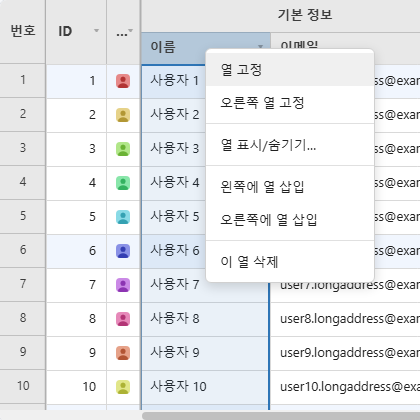
The menus themselves are described under Context Menus.
Keyboard
Moving and selecting
| Key | Action |
|---|---|
↑ ↓ ← → | Move the cell selection. With nothing selected, the first arrow selects the first cell |
Shift+↑ ↓ ← → | Extend the cell selection |
Tab / Shift+Tab | Move one cell right / left. The key stays inside the grid |
Home / End | First / last column of the current row (Ctrl+Home / Ctrl+End: first / last cell of the grid) |
PageUp / PageDown | Move the selection up / down by one screenful of rows |
Ctrl+A | Extend the selection to the sheet’s used range (Excel-style “current region”) |
Escape | Cancels an edit or a drag; otherwise closes an open filter panel or menu; otherwise clears the selection |
Ctrl+↑ | Move focus to the column header (see Keyboard focus on the headers) |
← on the first column | Move focus to the row-number gutter (row focus mode) |
Editing
| Key | Action |
|---|---|
Enter / F2 | Start editing the selected cell. On a checkbox column they toggle the box; on a radio column they move to the next option; on a button column they click the button |
Space | Same as F2, except that it types a space into a text cell |
| Any printable key | Starts editing a text cell with that character in place of its current value |
Enter (while editing) | Commit and move down one row |
Alt+Enter (while editing text) | Insert a line break; the row grows to fit |
Tab (while editing) | Commit and move right (Shift+Tab: left) |
Escape (while editing) | Cancel the edit |
Delete / Backspace | Clear the selected cell(s). Read-only cells are skipped |
Ctrl+Z | Undo |
Ctrl+Y / Ctrl+Shift+Z | Redo |
Delete, Ctrl+Z and Ctrl+Y / Ctrl+Shift+Z can be switched off one by one with the keyboardShortcuts option, which leaves the key for your own keydown handler:
new JHGrid({
  container: '#grid',
  data: rows,
  keyboardShortcuts: { delete: false },   // Delete/Backspace no longer clear cells; undo and redo stay on
});
Clipboard
| Key | Action |
|---|---|
Ctrl+C | Copy the selected cell or range as tab-separated text, the way a spreadsheet does. With rows selected and no cell selected, copies those rows |
Ctrl+X | Cut: copies the selected range the way Ctrl+C does, then empties its editable cells |
Ctrl+V | Paste, starting at the selected cell |
- Copied text is what the cells show: dates in their
format, edits included. A value that contains a tab, a quote or a line break is quoted, so it pastes back as one cell. - A copy covers the rows the grid is holding. Rows that have not loaded yet have no value to copy, so they are left out rather than pasted back as blank lines, and a message says how many. Selecting a whole million-row server-backed grid therefore copies the loaded part of it; to take every row somewhere else, use
exportCsv({ full: true }), which fetches them all. A grid built from adataarray already holds every row, so a copy there covers all of them. - A paste writes only to editable cells. Values that fall past the last row or column, or into a read-only column, are dropped and a message says how many. A paste never adds rows or columns.
- A cut is a copy followed by the same clear
Deleteperforms: read-only columns are copied but not emptied, and the whole cut is one undo step. It needs a cell or range selection; with only rows selected there is nothing it could sensibly clear, so the key is left alone. - A single value pasted onto a selected range fills the whole range.
- The whole paste is one undo step.
- An image on the clipboard, pasted onto an editable
type: 'image'cell, becomes ablob:URL that only exists in this page. Upload it and replace the value before you save. - The browser can ask for permission the first time a paste reads the clipboard.
- An insecure page still copies.
navigator.clipboardexists only in a secure context (HTTPS, orlocalhost), so over plain HTTP the keyboard handler steps aside and the browser’s owncopy/cut/pasteevents carry the same text instead - the keystrokes behave the same, and so do the Edit and context menus. What a secure context adds is the asynchronous API behindCtrl+V: without it, a paste arrives only through the browser’s own paste event, which a page cannot trigger from code.
Filling
Drag the small square at the corner of a selection (the fill handle) over neighbouring cells, up, down, left or right, and they are filled from the selection. Only editable columns are filled.
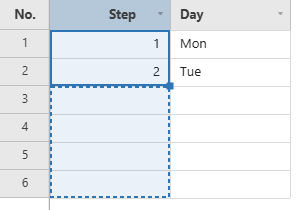
- A single number counts up by one for each cell (
2gives3, 4, 5, ...), and down by one when you drag up or left. - Two or more numbers with a constant step continue that step (
1, 2gives3, 4, 5;10, 20gives30, 40). - Dates in a
type: 'date'column continue by the step between them, in the column’s own pattern (03/01/2020, 03/02/2020gives03/03/2020underMM/DD/YYYY), and a single date counts up by a day. A week’s step stays a week, and a month end or a leap day is crossed correctly. - Anything else repeats the selected cells as a pattern (
Mon, TuegivesMon, Tue, Mon, ...). - The fill is one undo step, and
Escapeduring the drag cancels it.
Keyboard focus on the headers
The grid can be driven without a mouse all the way out to the headers:
| From | Key | Result |
|---|---|---|
| A selected cell | Ctrl+↑ | Focuses that column’s header |
| A focused header | ← / → | Moves to the neighbouring column’s header |
| A focused header | Enter / F2 / Space | Opens the column’s filter/sort panel |
| A focused header | ContextMenu or Shift+F10 | Opens the column’s right-click menu |
| A focused header | ↓ or Escape | Returns to the cell below it |
| A selected cell in the first column | ← | Focuses that row’s number (row focus) |
| A focused row number | ↑ / ↓ | Moves to the previous / next row |
| A focused row number | Enter / Space | Selects the row (when rowSelection is on; Ctrl/Shift extend it) |
| A focused row number | ContextMenu or Shift+F10 | Opens the row’s right-click menu |
| A focused row number | → or Escape | Returns to the first cell of that row |
Inside an open menu, ↑ / ↓ move between the items, Enter or Space runs the focused one, and Escape closes it. The filter panel keeps Tab inside itself, and Enter in its search box applies the filter.
Performance note:
Ctrl+Aon a very large dataset (hundreds of thousands of rows or more) selects the entire used range, andDeleteon that selection clears every cell in it synchronously, so the tab is unresponsive while it runs. Clearing 1,000,000 rows × 20 columns (20,000,000 cells) takes roughly 15 seconds and about 1 GB of extra memory, andCtrl+Ztakes about 12 seconds. Time and memory both grow with the number of cells cleared. RepeatingDeleteandCtrl+Zdoes not accumulate memory, and aDeleteover cells that are already cleared does nothing.
Accessibility
The canvas is hidden from assistive technology, and the grid keeps a small, real ARIA structure in step with it: a role="grid" element with the row and column counts, the column headers, and the active cell, which is announced when the selection moves. Name the grid with ariaLabel (it defaults to i18n.ariaGrid).
That role="grid" element is a container of its own inside the grid, holding nothing but the mirrored rows, because the role allows no other kind of child. Keyboard input goes to a hidden text field next to it, which carries aria-controls pointing at it and the aria-activedescendant naming the active cell. So the element to look for in a test or an integration is [role="grid"] within the grid’s root element, not the root itself.
- The rows on screen are real DOM, so a screen reader’s own table keys work: the cell to the left, the row above, “read this column” - none of it needs the selection to move first. The grid carries
aria-rowcountfor the whole table and mirrors only the window the user is looking at, the way a virtualised ARIA grid does, rebuilding it when that window moves rather than per frame.ariaRowMirror: falseturns it off, andariaRowMirror: { maxCells: 4000 }moves the point where a very wide grid stops paying for it (default 2000 cells; past it only the active cell is exposed, with one console warning). - Pinned rows are always in it, since they never leave the screen:
aria-rowcountcounts them andaria-rowindexputs them in reading order - the header is 1, then the rows pinned to the top, then the body, then the rows pinned to the bottom. A grand total row (summaryRow) is one of those, so a reader walking the table meets it where it is drawn. - Everything can be done from the keyboard: cells, the headers and the row numbers all take focus, the filter panel keeps
Tabinside it, and the menus are driven with the arrow keys. See the Interaction Reference. - Sorting, filtering, resetting filters, row selection, row reordering and pastes that dropped values are announced through a live region, in the wording of
i18n. - Under
prefers-reduced-motion: reducethe hover fade, selection glide, wheel easing and column slide are switched off and the loading shimmer is held still. - In Windows high-contrast mode (
forced-colors: active) the canvas colours are replaced by the system colours, so the grid stays legible with whatever theme you set, and go back when the mode ends.