Pagination
The default is continuous virtual scrolling; the pagination option switches to classic pages with a pager bar.
Pagination
The default is continuous virtual scrolling, but setting the pagination option switches to a classic page-based UI. Each page shows exactly pageSize rows (the last page holds the remainder), and scrolling only happens within that page; moving to the next/previous page only happens via the auto-rendered pager bar at the bottom («, ‹, page numbers, ›, ») or via goToPage()/nextPage()/prevPage().

const grid = new JHGrid({
  container: '#grid',
  fetchMeta, fetchData,
  pagination: { enabled: true, pageSize: 50 },
  onPageChange: (page, pageCount) => console.log(`${page + 1} / ${pageCount}`),
});

grid.nextPage();
grid.goToPage(3);
grid.getCurrentPage(); // 0-based
grid.getPageCount();
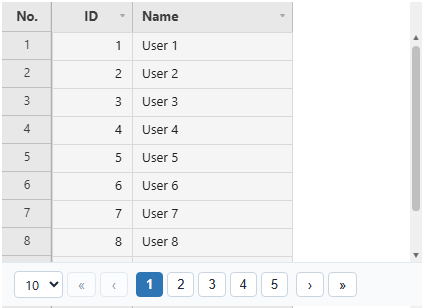
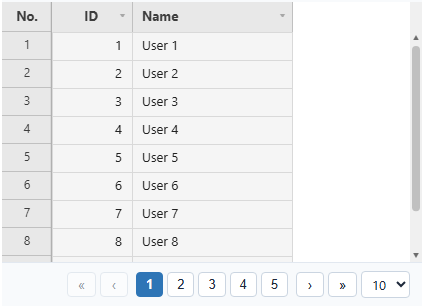
The pager bar shows up to five page numbers around the current page, next to the first, previous, next and last buttons. It sits below the grid, so the grid’s height is the height of the rows area and the container ends up a little taller than height (with responsive: true the bar is taken out of the container’s height instead). Changing page commits an open edit, clears the cell selection and scrolls to the top of the new page. Edits you have not saved are kept, and belong to the same absolute row indices as before.
Every public API that deals with row indices (getEdits(), onCellChange, etc.) always uses absolute indices relative to the entire dataset, regardless of pagination. Pagination only limits what’s scrolled/visible at once, it never changes how rows are addressed.
Letting users pick the page size
Add pageSizeOptions and the pager bar gets a page-size dropdown. The page controls (« ‹ page numbers › ») always stay centered on the bar; pageSizePosition puts the dropdown on the 'left' (the default) or the 'right'.
const grid = new JHGrid({
  container: '#grid',
  fetchMeta, fetchData,
  pagination: {
    enabled: true,
    pageSize: 25,
    pageSizeOptions: [10, 25, 50, 100],
    pageSizePosition: 'right',            // 'left' (default) or 'right'
  },
  onPageSizeChange: (pageSize) => localStorage.setItem('pageSize', String(pageSize)),
});

// Start from what the user chose last time, or change it from your own control:
grid.setPageSize(Number(localStorage.getItem('pageSize')) || 25);
pageSizeOptionstakes whole numbers of at least 1. They are listed ascending, duplicates are dropped, and the startingpageSizeis added if it is missing. Leave it out, or pass an empty array, for no dropdown.pageSizePositionis'left'or'right'; anything else means'left'. It only matters together withpageSizeOptions.- The dropdown shows just the number, with no caption. Its accessible name and tooltip come from the grid’s
locale(“Rows per page”, “페이지당 행 수”, …);i18n.pagerPageSizeoverrides that text. - Changing the size keeps the first row of the page you were on in view: the 4th page at 50 per page (rows 150-199) becomes the 7th page at 25 per page, and the 2nd page at 100 per page.
onPageChangealso fires if the page number moved because of the new size.getEdits()and the other index-based APIs are unaffected, since indices stay absolute.- Starting the grid from a saved size is a matter of passing it as
pageSize; the size is not part ofgetState().